
Can You Play Verity Mod Multiplayer?
Yes, a Verity Mod multiplayer setup can be planned for Java, but it is not a matter of placing one JAR on one computer and inviting everyone. The server and every client need the same Minecraft 1.20.1 and Forge generation, the matching Verity JE 5.7.4 release, and compatible GeckoLib and YACL files. The Modrinth release page is the source of truth for the current file; Bedrock add-ons are separate projects and do not join a Java Forge server.
Java 5.7.4 and multiplayer guidance checked August 22, 2026.

This guide does not start a download.
The short answer: multiplayer is a compatibility problem
The safest answer to “can you play Verity Mod with friends?” is: use the Java project as a coordinated Forge installation, not as a vanilla add-on. The current Verity JE release checked for this guide is 5.7.4 for Minecraft Java 1.20.1 and Forge. Every player joining the same world should use the same game version, loader family, Verity file and required dependency generation. If one player installs a Bedrock MCADDON or a different Java release, the server cannot make those files interchangeable.
The project description and the site's Java guide are useful starting points, but they do not guarantee that every host, modpack or remote AI configuration will work. Treat multiplayer as a small compatibility test. First make a clean server and one clean client connect locally; only then move the setup to a hosted service or an established world. This approach also gives you a reproducible baseline when a friend reports a crash or a missing feature.
- Java Edition only for this server path; Bedrock projects use different packages and instructions.
- Minecraft 1.20.1 and Forge must match on the server and clients.
- Use the current Verity JE 5.7.4 file and compatible GeckoLib and YACL releases.
- Keep a separate test world and never use an important save as the first multiplayer test.
| Route | What it can mean | Do not assume |
|---|---|---|
| Java Forge server | A modded server with Verity JE and its dependencies | That every host supports custom 1.20.1 Forge files |
| Java Realms | A private vanilla-style Realm for Java players | That Realms loads a Forge mod JAR |
| Bedrock / MCPE | Separate MCADDON projects with their own authors | That a Java JAR can be imported into Bedrock |
What must match on the server and every client
Write the compatibility matrix down before troubleshooting. A server can fail before the world opens when a loader, game version or dependency is wrong; a client can fail only when it tries to join. Matching filenames alone are not enough, because two files with similar names may target different Minecraft generations or carry different metadata.
For the current Java route, begin with Minecraft 1.20.1, Forge and Verity JE 5.7.4. The verified release file is named verity-5.7.4.jar and its published SHA-1 is 2c1a7a5d4105ce809c61846e42f39cda19375ef3. Check the official version list again when you update: a newer file can change the required dependency versions even when the Minecraft version stays the same.
- Minecraft: 1.20.1 on the server and each client.
- Loader: Forge, not Fabric, NeoForge or an unverified hybrid.
- Verity: the same 5.7.4 JAR from the maintained project listing.
- Dependencies: matching GeckoLib and YACL builds for the same Minecraft and loader generation.
- Optional services: the same documented connection assumptions, without sharing private API keys in chat.
| Check | Server | Client |
|---|---|---|
| Game and loader | Minecraft 1.20.1 + Forge | Minecraft 1.20.1 + Forge |
| Core file | verity-5.7.4.jar | verity-5.7.4.jar |
| Dependencies | GeckoLib + YACL versions that the release supports | The same dependency files and versions |
| World and config | Back up before changing the test setup | Use a clean profile before joining |
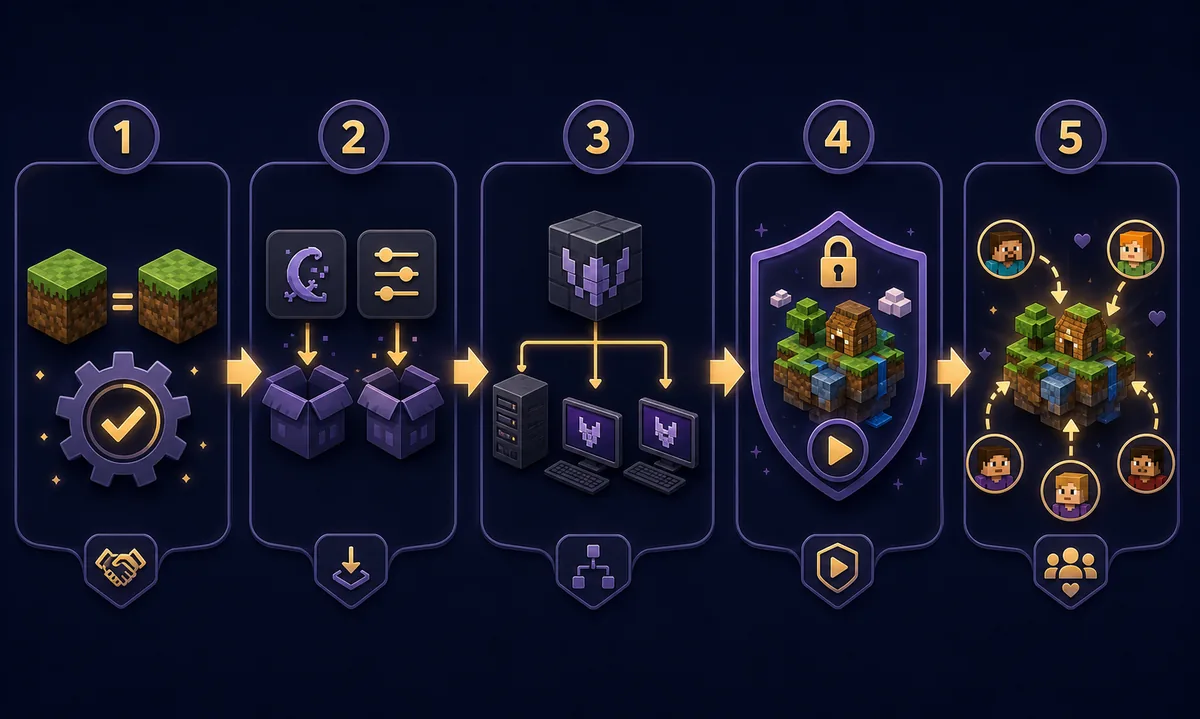
A safe five-step setup for a private test server
1. Freeze the target release. Open the official Verity JE version list and record the version number, Minecraft version, loader, filename and published hash. Do not build the server from a search-result mirror or from a renamed archive. The current record for this guide is 5.7.4, 1.20.1, Forge and verity-5.7.4.jar.
2. Create a clean server profile. Install the matching Forge server files in a new directory, accept the EULA only if you agree to Mojang's terms, and keep the test world separate from any important save. Add GeckoLib, YACL and Verity to the server's mods folder according to the release instructions. Do not mix old versions while “trying one more file.”
3. Build one matching client. Use a dedicated launcher instance with the same Minecraft and Forge versions, then add exactly the same mod and dependency set. Launch to the title screen before connecting. If the client fails locally, a server will not make it healthy.
4. Connect on the local network first. Confirm that the host can load a fresh world and that a second account can join without a mismatched-mod or missing-dependency message. Record the first meaningful error line from the log rather than only the final “connection lost” message.
5. Move to a hosted server only after the local test passes. Check the host's custom Forge and file-upload policy, then copy the known-good set and test a new world again. Keep the server address private until permissions, backups and the player list are ready.
- Use a separate folder, launcher profile and world for the first test.
- Make one change at a time so a failure remains reproducible.
- Keep the release page, file hash and log beside the test notes.
- Back up the world before changing the Verity version or removing dependencies.
Aternos, other hosts and Realms: what to check
A free or managed host is not automatically a modded Java host. Aternos' own Java mod guidance says the server and computer need the same mod loader and version, but availability of a specific Verity file still depends on the host's supported software and upload rules. Check the provider's current documentation and add-on catalogue on the day you configure it; do not promise that a custom JAR is available simply because another Forge mod is listed.
Realms is a different product path. Official Realms pages describe private Java or Bedrock worlds for players in the same edition, while a Forge mod server is a separate server software setup. Treat Realms as a vanilla multiplayer option unless the current official documentation explicitly supports the mod path you need. If the goal is Verity JE 5.7.4, a version-matched Forge server is the route to test first.
For Bedrock, stop and switch guides. The two projects listed on the site's Bedrock page have their own Project IDs, versions and import steps. A Bedrock player cannot join a Java Forge server by renaming an MCADDON or JAR, and an identically named project is not evidence that the implementations share a network protocol.
- Confirm the host's current Minecraft, Forge and custom-file support.
- Confirm whether the host allows the exact dependency files, not only the core mod.
- Confirm backups, access controls and how to restore the test world.
- If the host cannot reproduce the local Forge setup, choose another host or stay local.
Fix the first multiplayer error, not the last one
Most multiplayer failures become easier when you classify them before changing files. A “mismatched mods” message points to the set or version on one side. A missing dependency points to the loader generation or a file absent from the server. A connection timeout points to the address, port or host firewall, not necessarily Verity. A world that loads but has no conversation feature may be waiting for the project's separate AI or speech configuration.
Do not copy a full log into a public chat if it contains a server address, account identifier or private service setting. Share the game version, loader, mod list and the first relevant error line instead. The site's Java requirements guide and Java installation guide cover the base profile; this page adds the server-side coordination layer.
- Mismatched mods: compare the complete server and client file lists, including dependency versions.
- Missing dependency: confirm the dependency targets Minecraft 1.20.1 and Forge, then restart both sides.
- Wrong loader: remove Fabric, NeoForge or hybrid files from the test profile and rebuild with Forge.
- Timeout or refused connection: verify the host address, port forwarding and firewall separately.
- Feature does not respond: check the project's AI, speech or external-service notes without exposing credentials.
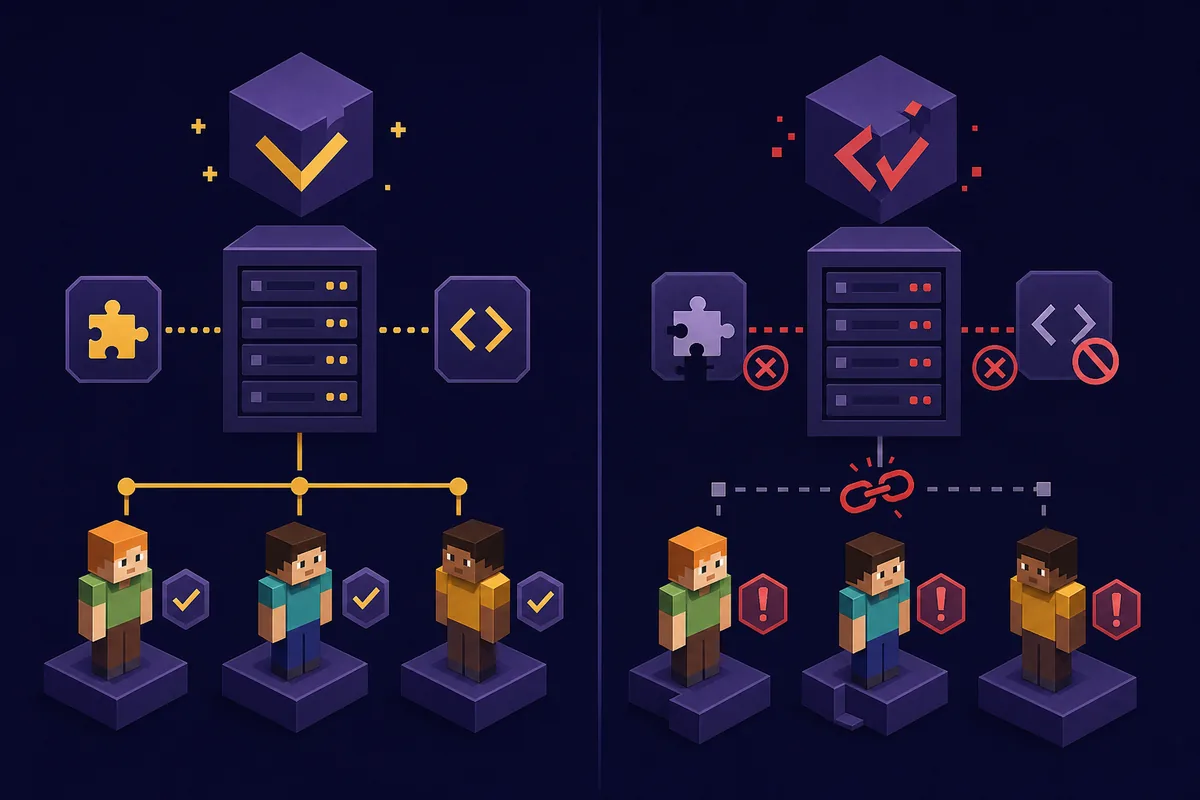
Updating a shared world without losing the baseline
When Verity JE publishes an update, do not replace the server JAR first and ask friends to “try joining.” Copy the world and server folder, record the old release, update a staging copy and test one client. Then update every joining client to the same release and dependency set. If the new version changes a config or world feature, keep the original backup until the group has completed a normal session.
A useful update note contains the old and new Verity version, Minecraft and Forge versions, dependency changes, the date checked, the file name and the published hash. If a player still uses an old launcher profile, the group should stop and align before opening the shared save. That small pause is safer than letting different clients write different assumptions into one world.
For source and integrity checks, use the download safety checklist and the download center as companion pages. The page you are reading is about coordination; it does not replace the maintained project listing or claim ownership of Verity files.
What this page does not promise
This guide does not promise that Verity works on every server host, with every modpack, through Java Realms or with every Bedrock add-on. It does not tell you to disable security controls, publish a private key or bypass a project's documented setup. It gives you a repeatable way to separate version problems, loader problems, network problems and optional AI-service problems before asking for support.
If your goal is only to install one player, use the Java installation guide. If you are deciding between Java and Bedrock, use the download center. If you are checking whether a file is trustworthy, start with download safety.
Before inviting friends, decide who administers the server, which accounts may join and where backups are stored. Share the version and file set, but never publish private addresses, tokens or external-service keys. A short change log gives the group a clear way back to the last working setup.
Verity Mod Multiplayer FAQ
Can I play Verity Mod with friends?
You can test the Java project with friends when the server and every client use compatible Minecraft 1.20.1, Forge, Verity JE 5.7.4 and GeckoLib/YACL dependencies. A Bedrock add-on is a separate project and cannot be treated as the same Java server mod.
Does Verity Mod work on Realms?
Do not assume it does. Realms and a Forge mod server are different hosting paths. For Verity JE, test a version-matched Forge server unless current official documentation for your exact product says otherwise.
Can I use Aternos for Verity Mod?
Only if the host supports the required Minecraft and Forge version, the exact mod and dependencies, and the provider's current upload or catalogue rules. Check the host on the day you set it up and reproduce a clean local test first.
Why does my friend get a mismatched mods error?
Compare both complete file lists, not only the Verity filename. Minecraft version, Forge version, GeckoLib, YACL, config files and the core Verity release all need to be compatible. Remove old copies before restarting both sides.
Can a Bedrock player join my Verity Java server?
Not through the normal Java Forge route. Java JAR files and Bedrock MCADDON projects use different editions and project implementations. Choose one edition and follow that project's own source and installation instructions.
Sources and provider checks
- Official Verity JE project and version list — Use the maintained release metadata for the current version, Minecraft target, loader, file name and published hashes.
- Aternos Java mod installation guidance — Provider guidance for matching the server and computer mod loader and version; availability of a particular Verity file must still be checked separately.
- Official Minecraft Realms overview — Use the official edition and hosting information when comparing Realms with a Forge mod server.